


PetDesk - Pet Health Reminders
4.813.43K Reviews
App Specs
- Version
- 10.0.1
- Updated On
- License
- Free
- Downloads
- 1,000,000+
- Developer
- PetDesk
- Categories
- Lifestyle
- Platform
- Android, iOS
Screenshots
 Analysis by AppCompare
When I think about inclusive pet-care tools, I look beyond whether an app has a long feature list. The useful question is whether someone can understand it, move through it without unnecessary effort, and fit it into the way they already care for an animal. That matters for a first-time owner, a person balancing several responsibilities, or anyone who needs reminders to reduce the mental load of everyday routines.
PetDesk is a free lifestyle app from PetDesk, and its central idea is to keep pet-care tasks close to the digital tools people already use. Its average rating is 4.8 from around 31,000 ratings, with more than 1 million installs. Those numbers suggest broad interest, but they do not tell me whether the app will suit every person or every clinic. I would judge it by how well its reminders and records fit my own routine.
Readability and navigation in a busy routine
The appeal of an app like this is practical: pet care involves small details that are easy to lose among work, errands, and family plans. A dedicated place for an animal’s appointments and health information can make those details easier to find than scattered notes, calendar entries, and messages. PetDesk is aimed at that everyday organizational problem rather than replacing a veterinarian’s advice.
Its simple, uncluttered approach is especially useful when I only have a moment to check what is coming up. A reminder works best when it answers a clear question—what needs attention, and when—without making me search through unrelated material. I would still take a few minutes during setup to use consistent names for pets and tasks. Clear labels make later checks faster, particularly in a household where more than one person helps with care.
There is a helpful distinction between a reminder and a record. A reminder prompts me to act; a record helps me explain an animal’s history when I speak with a clinic. Keeping those roles straight can prevent a common mistake: assuming a calendar alert is a complete medical record. I would use PetDesk to organize information, while relying on the veterinary team for decisions about treatment and timing.
Motor and sensory considerations
For someone who finds extended typing difficult, the best workflow is to enter only the information that will be useful later, rather than trying to build a perfect archive in one sitting. A short, consistently maintained record is often more practical than a detailed one that becomes too tiring to keep current. I would also check that important reminders are easy to recognize on the device, since a notification is only helpful if it stands out among the many alerts people receive.
People vary in how they read screens and respond to sound or vibration, so I would test the app in the conditions where I expect to use it. For example, someone who keeps a phone on silent may need to rely on visible notifications, while a person who has difficulty reading small text may prefer to review details on a larger screen if their device allows it. I would not treat any single alert style as a guarantee that a dose or appointment cannot be missed; a backup calendar or a shared household routine may be sensible for high-priority care.
Worth Reading Before You Choose

EA SPORTS FC Mobile 26 Is a Bigger Football Game, but It Takes Time

Flipboard Shows What News Apps Must Do Beyond the Feed

Switching to Android Auto Means Rethinking Your Driving Routine

Google Calendar Makes a Crowded Week Easier to Manage

Ludo King Makes the Most of the Minutes Between Plans

Baby Panda World Brings Quick Play to Modern Phones, but Its Game Library Feels Busy
Situational access: home, clinic, and shared care
Pet care is rarely confined to one quiet moment at home. I might need to check an appointment while commuting, prepare details before calling a clinic, or hand over care to a relative while I am away. In each case, having the relevant information organized in one place can reduce the scramble to remember dates or locate paper documents. I would review the details before a visit rather than assume that a phone screen alone will answer every question the veterinary team has.
A realistic routine could look like this: I notice that a pet’s appointment is approaching, check the date before arranging the rest of the week, and make sure the person taking the animal knows the plan. After the visit, I can use the record-keeping approach to keep useful notes together for the next conversation with the clinic. The key is to update information close to the event, while it is fresh, instead of waiting until several visits have blurred together.
For a household with multiple pets, I would make each profile easy to distinguish and confirm the animal’s name before acting on a reminder. That small pause is worthwhile when appointments or care routines differ. If several people share responsibility, it is also important to agree who is actually handling a task; an app can help organize care, but it cannot resolve an unspoken handoff between family members.
Where a dedicated pet app differs from ordinary tools
A general calendar is a strong alternative if all I need is a few appointment alerts. It may be quicker for someone who already manages every commitment there and does not want another account or app in the routine. The trade-off is that pet-related notes and records can end up mixed with work meetings and personal reminders, making them harder to review together.
Paper records remain useful, especially during a conversation where I want to jot down a detail quickly or keep a physical document with other paperwork. They do not depend on finding the right screen, but they can be less convenient when I am away from home or need to locate an older note. PetDesk makes more sense to me when I want a digital home for recurring pet tasks and information, not when I only need an occasional date written down.
Neither approach removes the need to communicate directly with a clinic. A reminder is not confirmation that an appointment has been booked, and stored information is not a substitute for professional guidance. I would use the app alongside the clinic’s own instructions and contact the clinic if a schedule, medication question, or record needs clarification.
Who is likely to benefit, and who may prefer another approach
I can see PetDesk being most useful for people who have several recurring responsibilities for a pet, care for more than one animal, or want a more dependable place for dates and health details. It may also help a newer owner who is still learning how much organization routine care involves. The app’s free price makes it easy to consider without a purchase decision, and its Everyone age rating makes it broadly suitable as a general-audience app.
On the other hand, someone who already has a reliable calendar-and-notes system may not gain much by moving the same information. A person who avoids phone notifications, prefers paper, or finds app setup burdensome may be better served by a simple written schedule and direct reminders from the household. The best choice is the one that people will actually maintain, not the one with the most convenient-sounding promise.
PetDesk was released on July 9, 2013, and its current version is 9.21, with Android support listed from version 6.0. Those details can help someone check basic compatibility before trying it. I would still make sure the app runs comfortably on the device I use and that its alerts fit my notification habits before relying on it for time-sensitive routines.
Remaining barriers and practical safeguards
Any phone-based organizer has limits. A notification can be overlooked, a device can be unavailable, and information can become outdated if nobody takes responsibility for maintaining it. For that reason, I would not put every critical care step on autopilot. For medication or a time-sensitive appointment, I would use a dependable backup when appropriate and keep the veterinary team’s instructions as the authority.
There can also be a learning curve in deciding what belongs in the app. Entering every detail at once may feel like a chore, while entering too little can leave an incomplete picture later. My practical approach would be to start with the next appointment and the information I know I will need, then add useful details as they arise. That makes the habit easier to sustain and helps avoid creating a record that looks comprehensive but is stale.
Before sharing a device or asking another person to help, I would check what information they need and agree how updates will be handled. That is not a technical feature; it is a useful household practice. A clear division of responsibility—who books, who transports, who follows up—can prevent the app from becoming one more place where everyone assumes someone else has acted.
Getting Started with PetDesk
First off, downloading PetDesk is a breeze. Available on both Android and iOS, it’s just a quick download away. Once installed, setting up your pet’s profile is as simple as pie. You just need to fill in a few details about your pet, and bam, you're all set to explore what the app has to offer.
Features That Make Life Easier
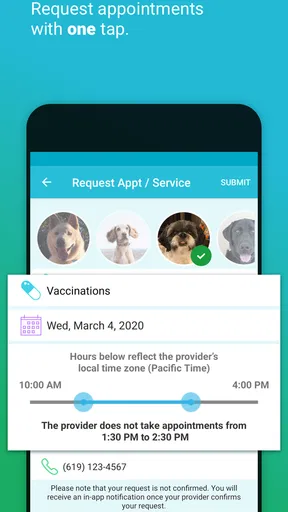
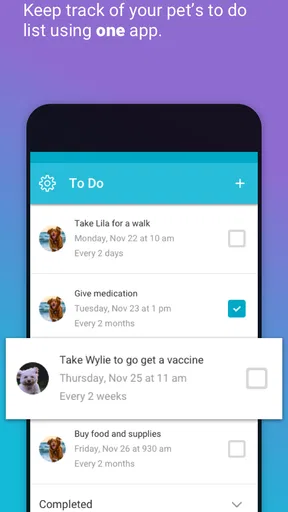
One of the standout features is the reminder system. We all know how easy it is to forget about medication times or upcoming vet visits when life gets hectic. PetDesk takes away that stress by sending you timely notifications. You can set reminders for vet appointments, vaccinations, grooming sessions, and even playdates. It’s like having a personal assistant dedicated to your pet’s well-being.
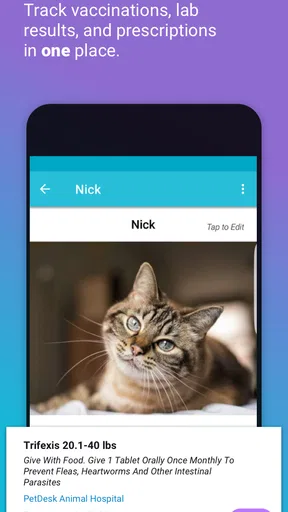
Another cool feature is the health records storage. All your pet’s medical history, vaccination records, and vet notes can be stored in one place. It’s super handy when you’re visiting a new vet or need quick access to your pet’s health info.
User Experience: Smooth Sailing or Rough Waters?
Using PetDesk is pretty intuitive. The interface is clean and user-friendly, which is a big plus for those of us who aren’t tech-savvy. Navigating through the app feels like a walk in the park. The menus are straightforward, and the app doesn’t bombard you with unnecessary options, keeping things simple and effective.
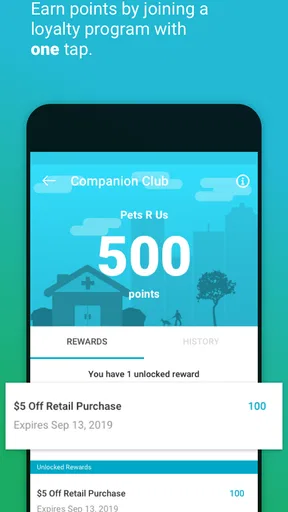
The app also offers a loyalty program, which I found to be a nice bonus. You can earn points for scheduling appointments and redeem them for discounts at participating vet clinics. It’s a neat way to save some bucks while keeping your pet healthy.
Is PetDesk Right for You?
If you’re someone who juggles multiple pets or struggles with remembering appointments, PetDesk could be your new best friend. It takes the hassle out of managing pet care and ensures you never miss a vet visit or medication dose.
However, if you’re already a pro at managing these schedules or prefer a more hands-on approach, you might find the app’s features a bit redundant. But hey, who doesn’t love a little extra help?
Final Thoughts
In a nutshell, PetDesk is a solid app for pet parents who want to streamline their pet care routine. With its user-friendly interface and helpful features, it’s a great tool to have in your pocket. Whether you’re a seasoned pet owner or a newbie, this app can surely help keep your pet's health on track. So go ahead, give it a whirl and see if it makes your life a tad bit easier.
Download links are just a tap away, and you might just find yourself wondering how you ever managed without it.
My inclusive verdict
My overall view is that PetDesk is most valuable when it reduces the effort of remembering and retrieving pet-care details, rather than when it is expected to manage care by itself. Its approachable presentation can lower the barrier for people who dislike complicated tools, while reminders and records offer a practical reason to keep it in a regular routine. I would begin with one pet and a small number of recurring tasks, then decide whether it genuinely makes the week easier.
With around 13,000 reviews alongside its strong average rating, the app has attracted substantial user feedback, though individual experiences will depend on personal routines and the clinics involved. For me, the best test is simple: can I find an upcoming task quickly, understand what it relates to, and keep the information current without adding more work than it saves? If the answer is yes, it earns a place on my phone. If not, a familiar calendar, paper record, or a combination of both may be the more inclusive and dependable fit.
Pros
- User-friendly interface for all ages.
- Customizable reminders to fit any schedule.
- Integration with vet records is seamless.
- Includes pet-friendly business locator.
- Allows multiple pet profiles with ease.
Cons
- Limited to certain veterinary networks.
- Some features require premium purchase.
- Occasional sync issues with calendars.
- Notifications can be overly frequent.
- Limited customization for notifications.
FAQs for PetDesk - Pet Health Reminders
What is PetDesk, and how can it help manage my pet’s health?
PetDesk is a comprehensive app designed to assist pet owners in managing their pets' health. It offers features like appointment scheduling, medication reminders, and direct communication with veterinarians. This app serves as a digital pet health organizer, ensuring that you never miss a vet visit or a medication dosage.
Is PetDesk available for both Android and iOS devices?
Yes, PetDesk is available for download on both Android and iOS platforms. Users can easily find it on the Google Play Store and Apple App Store, making it accessible for a wide range of smartphones and tablets. Ensure your device meets the app’s compatibility requirements before downloading.
Are there any costs associated with using PetDesk?
PetDesk is free to download and offers numerous features at no cost. However, some users might encounter premium features that could require in-app purchases. It's best to check the app’s description in the app store for detailed information on any potential costs.
How does PetDesk ensure the security of my pet’s information?
PetDesk employs robust security measures to protect your data. It uses encryption protocols to secure personal and pet information. Regular updates and privacy policies ensure that your data remains confidential and safe from unauthorized access. Always review their privacy policy for more details.
Can I connect multiple pets to my PetDesk account?
Yes, PetDesk allows you to manage multiple pets under a single account. This feature is particularly beneficial for households with several pets, as it enables you to organize and track each pet’s appointments, medications, and health records efficiently from one convenient platform.


